














Table of Contents
- How Do You Effectively Manage Invoices?
- How Do I Make a Perfect Invoice?
- What Are the Three Main Steps Involved in Invoice Processing?
- Invoice Best Practices in Accounting
- Optimize Your Invoicing Process with Paystand
Key Takeaways
- Efficient invoicing practices are crucial for B2B businesses, impacting financial health and client relationships by ensuring steady cash flow and transparency.
- An invoice management system, clear procedures, customer communication, payment schedules, invoice tracking, and the use of technology can simplify invoice management.
- The best invoice format is clear and concise, including necessary details like invoice number, date, seller and buyer information, description of goods/services, total amount, and payment terms.
- The three main steps in invoice processing are data entry and capture, invoice approval, and payment, which ensure accurate and timely payments.
- Best practices in invoicing include labeling the document as "Invoice," clearly identifying the sender and recipient, including invoice information and dates, specifying payment terms, highlighting the invoice total, and providing a detailed, itemized list of services or products.
We’ve already discussed what is an invoice. For B2B businesses, efficient invoicing best practices are essential. They impact the business's financial health and client relationships. However, invoicing is more than just a routine process. It represents the backbone of cash flow and the basis for trust and transparency in every transaction.
Imagine a scenario where invoices are processed seamlessly, B2B payments are received on time, and cash flow remains steady. Good invoicing practices can make this a reality, providing benefits that enhance business operations and foster stronger client relationships. From reducing administrative burdens to improving accuracy and accelerating payment cycles, the advantages of optimized invoicing are manifold.
Ready to discover how to transform the invoicing process and reap these benefits? Keep reading to explore the best practices that elevate invoicing and drive businesses forward.

How Do You Effectively Manage Invoices?
Managing invoices can be time-consuming and complex, especially for businesses with a high processing volume. The process often involves manual data entry, tracking due dates, and chasing payments.
Here are some tips for effectively managing invoices:
- Use an invoice management system. An invoice management system can help automate many invoice processing tasks, such as data entry, tracking, and payment reminders.
- Establish a clear invoice processing procedure. A clear invoice processing procedure will help ensure invoices are processed accurately and efficiently. This procedure should include invoice receipt, data entry, approval, and payment.
- Communicate with customers. It is important to communicate with customers about the invoice processing procedures. This will help them understand when and how to submit invoices and avoid misunderstanding payment terms.
- Set up a payment schedule. A payment schedule will ensure timely invoice payments, helping maintain good supplier relationships and avoid late payment fees.
- Track invoices. It is important to track invoices to easily see which invoices have been paid and which are still outstanding. This will help avoid duplicate payments and ensure there aren’t any missing invoices.
- Use technology to your advantage. Many technologies, such as e-invoicing and scanning software, can drive efficient invoice and accounts receivable management.
How Do I Make a Perfect Invoice?
Creating the perfect invoice involves several key elements to ensure clarity, accuracy, and professionalism. At the top, include the company's name, logo, and contact information. Clearly label the document as an "Invoice" and assign a unique invoice number for tracking. Include the invoice date and payment due date to establish a clear timeline. To personalize it, list the client's details, such as their name, company, and contact information.
Detail the products or services provided with descriptions, quantities, and prices, ensuring transparency. Calculate the subtotal, apply any taxes or discounts, and prominently show the total amount due. Include payment terms, such as accepted payment methods and instructions, to avoid confusion. Adding a note of appreciation or a personalized message can also enhance client relations. Double-check for accuracy and completeness before sending to maintain professionalism and prevent payment delays.
What is the Best Format for an Invoice?
The best format for an invoice is clear, concise, and easy to understand. It should include all of the necessary information, such as:
- Invoice number
- Invoice date
- Seller’s name and address
- Buyer’s name and address
- Goods or services description
- Goods or services quantity
- Goods or services unit price
- The invoice’s total amount
- Payment terms
In addition to the required information, an invoice may also include other information, such as:
- Purchase order number
- Shipping address
- Billing address
- Discount amount
- Tax amount
- Late payment fee
The format of an invoice can vary depending on the business. However, it is important to use a consistent format so that invoices are easy to identify and track.
What Are the Three Main Steps Involved in Invoice Processing?
Invoice processing is critical in any business, ensuring that invoices are paid accurately and on time. The process can be complex and time-consuming, but it can be streamlined by following the three main steps outlined below:
1. Data Entry and Capture
The first step in invoice processing is to enter and capture the data from the invoice. This can be done manually or electronically, depending on the size and complexity of the business. If invoices are entered manually, they must be accurate and consistent to avoid errors. When invoices are captured electronically, they must be used by a system that can accurately extract the data from the invoice.
2. Invoice Approval
Once the invoice data has been entered and captured, it must be approved before it can be paid. This step typically involves a review of the invoice by a designated approver, such as a manager or accountant. The approver will review the invoice to ensure that it is accurate and that the goods or services described were received.
3. Payment
Once the invoice has been approved, it can be paid. This step typically involves issuing a check or electronic payment to the supplier. Ensuring the payment is made on time is important to avoid late fees and other penalties.
Invoice Best Practices in Accounting
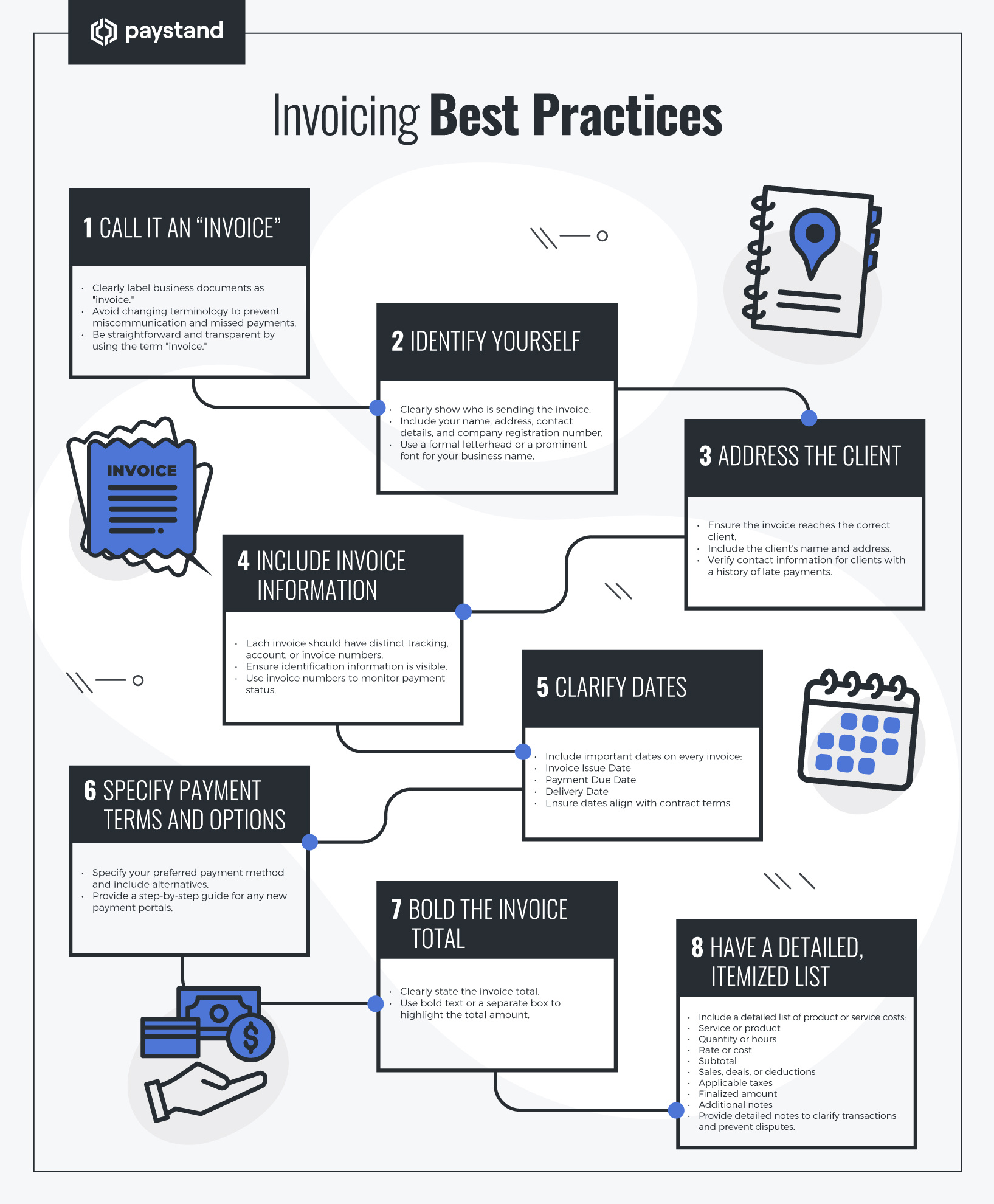
In addition to the three main steps outlined above, businesses should consider other factors when processing invoices. These factors are considered best practices and include:
1. Call It an "Invoice"
To ensure clarity and avoid confusion, it's essential to label a business document as an "invoice," even if some companies prefer to use different terminology. Changing the vocabulary of an invoice can lead to miscommunication and missed payments due to a lack of transparency.
The best practice is to be straightforward and transparent by using the term "invoice" and ensuring clients understand its purpose and expectations. This approach helps maintain a clear and consistent process for both parties involved.
2. Identify Yourself
A good invoice clearly shows who is sending the invoice. Near the top, the invoice should include your name, address, contact details, and company registration number. If you have a formal letterhead for your business, use it and make it prominent. If you do not have one, choose a larger or bolder font for your business name to make it obvious who sent the invoice.
3. Address the Client
When creating an invoice, it's crucial to ensure it reaches the correct client. Including the client's name and address on the invoice is essential. Often, identifying the right person is the initial challenge in sending invoices. If a particular client consistently makes late payments on previous invoices, verify the contact information and point of contact are accurate to ensure the invoice is delivered directly to them.
4. Include Invoice Information
For efficient management, each invoice should have distinct tracking, account, or invoice numbers. This identification information must be visible to facilitate tracking. An invoice number aids in monitoring which invoices have been settled in full and which are still outstanding, streamlining the invoicing process.
5. Clarify Dates
Dates are essential for clarifying when an invoice was sent and when payment is anticipated. They enable the tracking of invoice payments promptly, from as early as one day to as long as 90 days after the invoice reaches the client. Here are the important dates that should be included on every invoice:
- Invoice Issue Date
- Payment Due Date
- Delivery Date
If you have contracts with clients that provide various payment schedule options, ensure the invoice dates align with the terms specified in the contracts. Managing multiple clients with different contracts can be challenging, but an automated invoice platform can greatly simplify this process.
6. Specify Payment Terms and Options
When specifying your preferred payment method, include alternative payment options. If you've recently implemented a new payment portal, please provide a concise, step-by-step guide on how to make a payment through it.
7. Bold the Invoice Total
Clearly state the invoice total. It's best practice to put the invoice total in bold. Some companies make a separate box for the invoice total to avoid confusion.
8. Have a Detailed, Itemized List
Including a detailed list of product or service costs is essential when creating an invoice. This list should address any potential questions about the invoice price and provide clarity to the recipient. Typical components of this section of an invoice include:
- Service or product
- Quantity or hours
- Rate or cost
- Subtotal
- Any sales, deals, or deductions
- Applicable taxes
- A finalized amount
- Additional notes
When adding notes to transactions, be as detailed as possible. This will clarify the context and help prevent any confusion or disputed fees in the future.
Optimize Your Invoicing Process With Paystand
Paystand is a leading provider of invoicing solutions that can help you streamline your invoicing process, save time, and get paid faster. With Paystand, you can send invoices electronically, track payments, and manage your receivables in one place.
Here are some of the benefits of using Paystand for your invoicing needs:
- Electronic invoicing
- Payment tracking
- Accounts receivables management
In addition to these features, Paystand also offers a number of tools that can help you optimize your invoicing process. These tools include:
- Customizable invoices
- Automated reminders
- Online payment processing
- Reporting and analytics
If you're looking for a way to streamline your invoicing process, save time, and get paid faster, then Paystand is the solution for you. Contact us today to learn more about how Paystand can help you.