












paystand symbol white logoAR + PAYMENTS
|
AP + EXPENSE
|
LATAM AR + AP
|
FX + PAYOUTS
|
.org
  • Receivables

    ACCOUNTS RECEIVABLES

    • Automatic Reconciliation
    • Collections Automation
    • Payment Portal
    • Convenience Fees & Incentives
    • Billing & Receivables Automation
    • Dashboard & Reporting
    • NetSuite NetSuite
    • Sage Intacct Sage Intacct
    • Dynamics 365 Dynamics 365
    • Acumatica Acumatica
    • Adobe Commerce Adobe Commerce
    • BigCommerce BigCommerce
    • Woo Commerce Woo Commerce
    • Xero Xero
    • All Integrations All Integrations
  • Payables

    ACCOUNTS payables

    • AP Automation
    • Accounting Automation
    • International Payments
    • Purchase Order Approvals & Spend Approvals
    • Customer Portal

    WHY NOW

    Our push into Accounts Payables comes with our mission of becoming the one stop shop for the CFO.

    By integrating AP, our financial suite becomes even more powerful as we aim to automate everything money.

  • Payments

    OUR NETWORK

    Discover how we enable your business to receive fee-less payments at a faster speed than your current solution.

    We transition your costliest payers into cost-effective payment rails to return the most positive of ROIs.

    OVERVIEW

    • B2B Payments
    • Paystand Bank Network
    • Check Scan
    • eCheck and ACH
    • Smart Lockbox
    • Canadian EFT
    • Push Payments (AI Match)
  • Expense

    EXPENSE

    • Spend Management
    • Corporate Cards
    • Procurement
    • Spend Analytics
    • Slack Slack
    • Microsoft Teams Microsoft Teams
    • Quickbooks Online Quickbooks Online
    • NetSuite NetSuite
    • Sage Intacct Sage Intacct
    • Microsoft Dynamics 365 Microsoft Dynamics 365
    • All Integrations All Integrations
  • Resources
    • Blog
    • Case Studies
    • Glossary
    • Podcast
    • Events
    • Webinars
    • Datasheets
    • eGuides

    INDUSTRIES

    • Healthcare
    • Manufacturing
    • Construction
    • Supply Chain
    • Solar Energies
    • Retail
    • Wholesale

    DATA & INFRASTRUCTURE

    • Enterprise Blockchain
    • APIs

    LEARNING RESOURCES

    • Improving Cash Flow
    • Optimizing AR
    • Reducing Costs
    • Bitcoin at Paystand
  • Company

    Company

    Paystand is revolutionizing B2B payments with a modern infrastructure built as a SaaS on the blockchain, enabling faster, cheaper, and more secure business transactions.

    Our mission is to reboot commercial finance by creating an open financial system.

    Payments as a Service

    PARTNERS

    Join Paystand's partnership program today.

    Become a Partner

    PRESS

    Read about Paystand business updates and technology announcements.

    Read About Paystand

    CAREERS

    Join our fast-growing team of disruptors and visionaries.

    Grow With Paystand

    ABOUT US

    See how we are rebooting commercial finance.

    Learn About Our Mission

    Where We Operate

    United states

    USAPaystand is headquartered in California and operates nationwide, serving businesses across all 50 states.


    canada

    CANADAWe support operations in Canada with localized payment capabilities, including CAD EFT and cross-border support.

Bitcoin
Get Started
  • Login
  • Receivables
    • Automatic Reconciliation
    • Collections Automation
    • Payment Portal
    • Convenience Fees and Incentives
    • Billing & Receivables Automation
    • Dashboard & Reporting
    • NetSuite
    • Sage Intacct
    • Dynamics 365
    • Acumatica
    • Adobe Commerce
    • BigCommerce
    • WooCommerce
    • Xero
    • All Integrations
  • Expenses
    • Spend Management
    • Corporate Cards
    • Procurement
    • Spend Analytics
    • Slack
    • Microsoft Teams
    • Quickbooks Online
    • NetSuite
    • Sage Intacct
    • Microsoft Dynamics 365
    • All Integrations
  • Payables
    • AP Automation
    • Accounting Automation
    • International Payments
    • Purchase Order Approvals & Spend Approvals
    • Customer Portal
  • Payments
    • B2B Payments
    • Paystand Bank Network
    • Check Scan
    • eCheck and ACH
    • Smart Lockbox
    • Canadian EFT
    • Push Payments: AI Match
  • Resources
    • Blog
    • Case Studies
    • Datasheets
    • eGuides
    • Events
    • Webinars
    • Glossary
    • Podcasts
    • Improving Cash Flow
    • Optimizing AR
    • Reducing Costs
    • Bitcoin at Paystand
    • The Future of Finance - Get Your Copy
    • Enterprise Blockchain
    • APIs
  • Industries
    • Healthcare
    • Manufacturing
    • Construction
    • Supply Chain
    • Retail
    • Solar
    • Wholesale
  • Company
    • Abous Us
    • Payments as a Service
    • Become a Partner
    • Press
    • Careers
  • Login
  • Get Started
Zazil Martinez 07/22/2024
4 Minutes

What is Cash Application? Understanding Its Importance in B2B

What is Cash Application? Understanding Its Importance in B2B

Table of Contents

  1. What Is Cash Application’s Meaning?
  2. How is the Cash Application Process?
    1. Cash Application Process Steps
  3. What Makes Cash Application Complex?
  4. Cash Application Challenges
  5. How Cash Application Impacts Business Relationships
  6. How to Use Cash application?


In commercial transactions, the flow of goods and services rarely waits for payments to be processed. This process, known as cash application, is critical for business success. If the business relationship is in good standing and solid, their accounts are assumed sufficient to cover regular service exchanges.

Cash application is critical for the success of commercial transactions, but it can be complex in B2B exchanges. Transaction delays, invoice matching, and manual processes create account receivable challenges. This article explores the complexities of cash application and discusses solutions for streamlining the process.


Key Takeaways

  • Cash application is crucial for commercial transactions, ensuring accurate matching and processing of payments from B2B customers.
  • Challenges in cash application include manual processing, lack of automation, data quality issues, multiple payment channels, fraud, and compliance requirements.
  • Cash application automation can reduce errors, shorten DSO, enhance analytics, and improve the visibility of the payment process.
  • Timely and accurate cash application is essential for maintaining positive vendor relationships and customer trust in B2B transactions.


What is Cash Application’s Meaning?

Cash application is the process of accurately matching payments from B2B customers to their orders or open invoices and then processing the payment so the money is available to be spent.

A cash application team typically tracks three types of data:

  • Invoices or orders
  • Payments
  • Remittances, especially in the case of partial payments

However, this method is hardly possible for modern billing. 78% of finance professionals affirm that manual processes result in errors. Manual methods aren't practical or efficient due to commercial transactions' ever-growing volume and complexity.
New call-to-action

How is the Cash Application Process?

Cash application is critical for AR, and its efficiency and accuracy can significantly impact a company's cash flow and financial performance. Here are the steps involved in the process.


Cash Application Process Steps

  1. Payment receipt. When a customer makes a payment, it can be received in various forms, such as checks, EFTs, or credit cards.
  2. Data entry. The payment information, including the amount, date, and customer reference number, enters the company's accounting system.
  3. Matching payments to invoices. This can be done manually or through automated matching algorithms. The criteria include invoice number, customer account number, and payment amount.
  4. Posting payments. Once payments match the invoices, they are posted to the customer's account. This updates the customer's balance and reduces the invoice’s outstanding amount.
  5. Cash reconciliation. The total payment amount received is reconciled with the cash deposited into the company's bank account.
  6. Reporting and analysis. The process generates reports providing insights into the company's cash flow, customer payment patterns, and DSO to help accounts receivable management, monitor cash application efficiency and identify areas for improvement.


To optimize the cash application process, companies can implement various strategies, such as:

  • Process automation to reduce manual errors and increase efficiency.
  • Multiple payment options to provide convenience and accelerate payment.
  • Lockbox services to speed up the processing of payments.
  • Clear guidelines and procedures for handling customer inquiries and disputes.


What Makes Cash Application Complex?

In the past, manual cash application was simple, but today's complex invoicing and payment methods make invoice matching challenging for accounts receivable specialists. Payments often don't match invoices, leading to confusion, manual work, payment discrepancies, long-outstanding invoices, and unapplied cash.


Cash Application Challenges

Cash application can be challenging, especially for businesses with high payment volume. Some of the common challenges associated with cash application include:

  1. Manual processing. Many businesses still process cash applications manually, which can be time-consuming and error-prone.
  2. Lack of automation. Automation can help streamline processes and reduce errors, but many AR teams still use manual cash application.
  3. Data quality. Accurate cash application data is essential for successful reconciliation. However, due to human error and system limitations, businesses often struggle to maintain accurate data.
  4. Multiple payment channels. Accepting different payment methods, such as checks, EFTs, or credit cards, can make tracking and reconciling payments difficult.
  5. Fraud. Fraudulent payments are a growing problem for businesses. This can result in lost revenue and damage to the company's reputation.
  6. Compliance. Businesses must comply with various regulations, such as the Sarbanes-Oxley Act and the PCI DSS, which adds to the complexity and cost of cash application.


How Cash Application Impacts Business Relationships

In B2B transactions, prompt and accurate accounts and billing processes are essential for fostering positive vendor relationships.

Delayed payments can have a significant impact on customer experience and trust. When payments are not processed promptly, customers may experience unease, cash flow forecasting challenges, and inaccurate bank balances. This can lead to accidental duplicate payments or customers using funds that should have been applied to outstanding invoices.

A manual cash application process can be particularly problematic for customers who rely on credit. Timely matching payments to outstanding invoices allows customers to replenish their credit quickly and maintain access to their business credit lines. However, delays in the accounts receivable process can result in customers not having access to their business credit, which can disrupt operations and weaken relationships.

A timely cash application process in B2B sales serves as both a relief and a courtesy to customers, enabling them to maintain accurate financial records and plan their cash flow effectively. It also has the added benefit of building trust and preserving hard-earned relationships.

Strategies for A/R & Finance leaders


How to Use Cash Application?

The best way to improve cash flow and streamline your cash application process is through automation.

AR Automation largely centers around cash application and streamlined invoice matching. There are quite a few benefits to automatic cash application software, including:

  • Fewer cash flow bottlenecks
  • Decreased or eliminated errors from payment processing
  • Overall cost reduction
  • Shorter DSO
  • Enhanced analytics, such as remittance data
  • Improved, potentially 100% visibility of the payments process


Setting up automation in the accounts receivable flow is less of a competitive advantage and more bare-bones essential these days. ERPs are helpful but rely on a manual cash application process. Automating your ERP processes with a cash application software integration requires a low learning curve since financial professionals still use their known ERP. But they can reap all the benefits of automatic cash application. That's why a cash application team relies on automation integrations that work with their ERP.

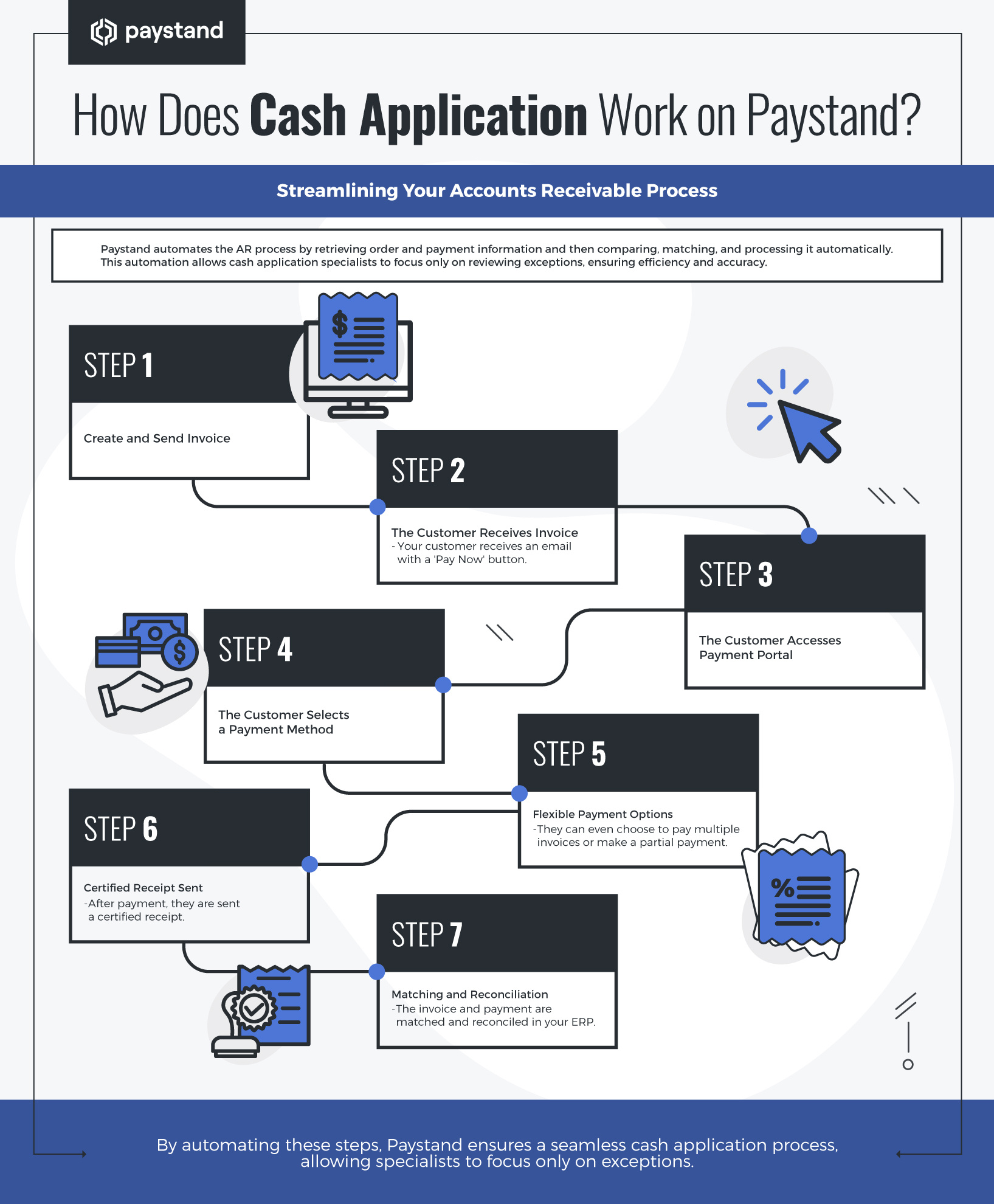
Through an automated accounts receivable process, they can retrieve order and payment information from multiple sources and then compare, match, and process it. At Paystand, these steps are automated, so a cash application specialist only has to review the exceptions.

Here's how it works:

  1. You create an invoice and send it to the customer.
  2. Your customer receives an email with a "Pay Now" button.
  3. Your customer goes to the payment portal.
  4. They select their payment method.
  5. They can even choose to pay multiple invoices or make a partial payment.
  6. After payment, they are sent a certified receipt.
  7. The invoice and payment are matched and reconciled in your ERP.
what is cash application

Interested in reading more about how to optimize your accounts receivable process? Check out our Quick Guide to Understanding Accounts Receivable Management.


Written by Zazil Martinez

10 years of content creation for digital platforms, as well as a creative lead for advertising, marketing campaigns, and copywriting

Share:

  • Follow us on Facebook
  • Follow us on Twitter
  • Follow us on Linkedin
  • Follow us on Pinterest

Everything You Need to Know About Decentralized Finance

Previous Post

Revolutionize Your Business with B2B Crypto Payments

Next Post
  • There are no suggestions because the search field is empty.

Subscribe Here!

Category

  • B2B Payments (112)
  • AR Optimization (96)
  • AR Automation (93)
  • Payment Processing (72)
  • Billing & Invoicing (71)

Popular Posts

Zazil Martinez 08/22/2024
What Is a TID Number? The Key to Secure Transactions
Analisa Flores 03/12/2025 Smart Lockbox
What is a Bank Lockbox Service and How is it Used for Payments?
Zazil Martinez 02/27/2025 B2B Payments, Billing & Invoicing, AR Optimization, AR Health
How to Improve Your Financial Decision Making?
Zazil Martinez 07/15/2024 Credit Cards
What is a Credit Card Hold? A Closer Look

Related Posts

B2B Payments, AR Automation, AR Optimization
Analisa Flores 20 November, 2025

Your Guide to Exploring Innovation at Acumatica Summit 2026

Table of Contents

Read This Article
Billing & Invoicing, AR Optimization
Vivek Shankar 14 October, 2025

Invoicing 101: Components, Types, and Best Practices

Table of contents

Read This Article
AR Optimization
Analisa Flores 10 October, 2025

How to Fix Your AR: AR Metrics That Actually Improve Cash Flow

Table of Contents

Read This Article

Paystand is on a mission to create a more open financial system, starting with B2B payments. Using blockchain and cloud technology, we pioneered Payments-as-a-Service to digitize and automate your entire cash lifecycle. Our software makes it possible to digitize receivables, automate processing, reduce time-to-cash, eliminate transaction fees, and enable new revenue.

  • Receivables
    • Automatic Reconciliation
    • Collections Automation
    • Payment Portal
    • Convenience Fees and Incentives
    • Billing & Receivables Automation
    • Dashboard & Reporting
    • NetSuite
    • Sage Intacct
    • Dynamics 365
    • Acumatica
    • Adobe Commerce
    • BigCommerce
    • Woo Commerce
    • Xero
    • All Integrations
  • Payables
    • AP Automation
    • Accounting Automation
    • International Payments
    • Purchase Order Approvals & Spend Approvals
    • Customer Portal
  • Legal
    • Privacy Policy
    • Terms of Service
  • Support
    • Knowledge Base
    • Developer Hub
  • Payments
    • B2B Payments
    • Paystand Bank Network
    • Check Scan
    • eCheck and ACH
    • Smart Lockbox
    • Canadian EFT
    • Push Payments: AI Match
  • Expense
    • Spend Management
    • Corporate Cards
    • Procurement
    • Spend Analytics
    • Slack
    • Microsoft Teams
    • Quickbooks Online
    • NetSuite
    • Sage Intacct
    • Microsoft Dynamics 365
    • All Integrations
  • Company
    • About Us
    • Payments as a Service
    • Become a Partner
    • Careers
    • Press
    • Sitemap
  • Resources
    • Blog
    • Case Studies
    • Datasheets
    • eGuides
    • Events
    • Podcast
    • Webinars
    • Glossary
  • INDUSTRIES
    • Healthcare
    • Manufacturing
    • Construction
    • Supply Chain
    • Solar Energies
    • Retail
    • Wholesale
  • DATA & INFRASTRUCTURE
    • Enterprise Blockchain
    • APIs
  • LEARNING RESOURCES
    • Improving Cash Flow
    • Optimizing Accounts Receivable
    • Reducing Costs

© Paystand, Inc. 2025. All Rights Reserved.