Table of Contents
- What Is NetSuite Training and Why Does It Matter?
- Where Can I Learn NetSuite for Free?
- Can I Teach Myself NetSuite?
- How Long Does It Take to Learn NetSuite?
- How Difficult Is NetSuite to Master?
- Optimize Your NetSuite Investment With Paystand's Autonomous AR
- Frequently Asked Questions
Key Takeaways
- NetSuite training encompasses learning core ERP functionality, financial management modules, business processes, and saved search capabilities to maximize platform ROI
- Free NetSuite training resources include SuiteAnswers documentation, NetSuite User Groups, YouTube tutorials, and trial environment hands-on practice
- Self-directed learning is viable for motivated users, though structured netsuite courses and vendor-led programs accelerate proficiency and reduce errors
- Basic NetSuite competency typically requires 3-6 months for finance professionals, while advanced mastery of custom workflows and complex saved search queries can take 12-18 months
- The platform's difficulty varies by role—controllers need deeper financial module expertise while AR/AP managers focus on transaction processing and automation workflows
NetSuite represents a significant investment for mid-market and enterprise organizations, with implementation costs ranging from $50,000 to over $500,000 depending on company size and complexity. Yet many finance teams struggle to capture the platform's full value because users never move beyond surface-level functionality. The controller who only knows how to run standard reports. The AR manager who manually processes payments instead of leveraging automation. The CFO who cannot access real-time cash flow visibility because saved searches remain a mystery.
Effective NetSuite training closes this gap, transforming expensive software into a strategic finance asset. Organizations that invest in comprehensive training reduce month-end close time by 30-50%, eliminate manual data entry errors, and free finance teams to focus on analysis rather than transaction processing. The question isn't whether your team needs NetSuite training—it's how to structure that training for maximum business impact while minimizing disruption to daily operations.
What Is NetSuite Training and Why Does It Matter?
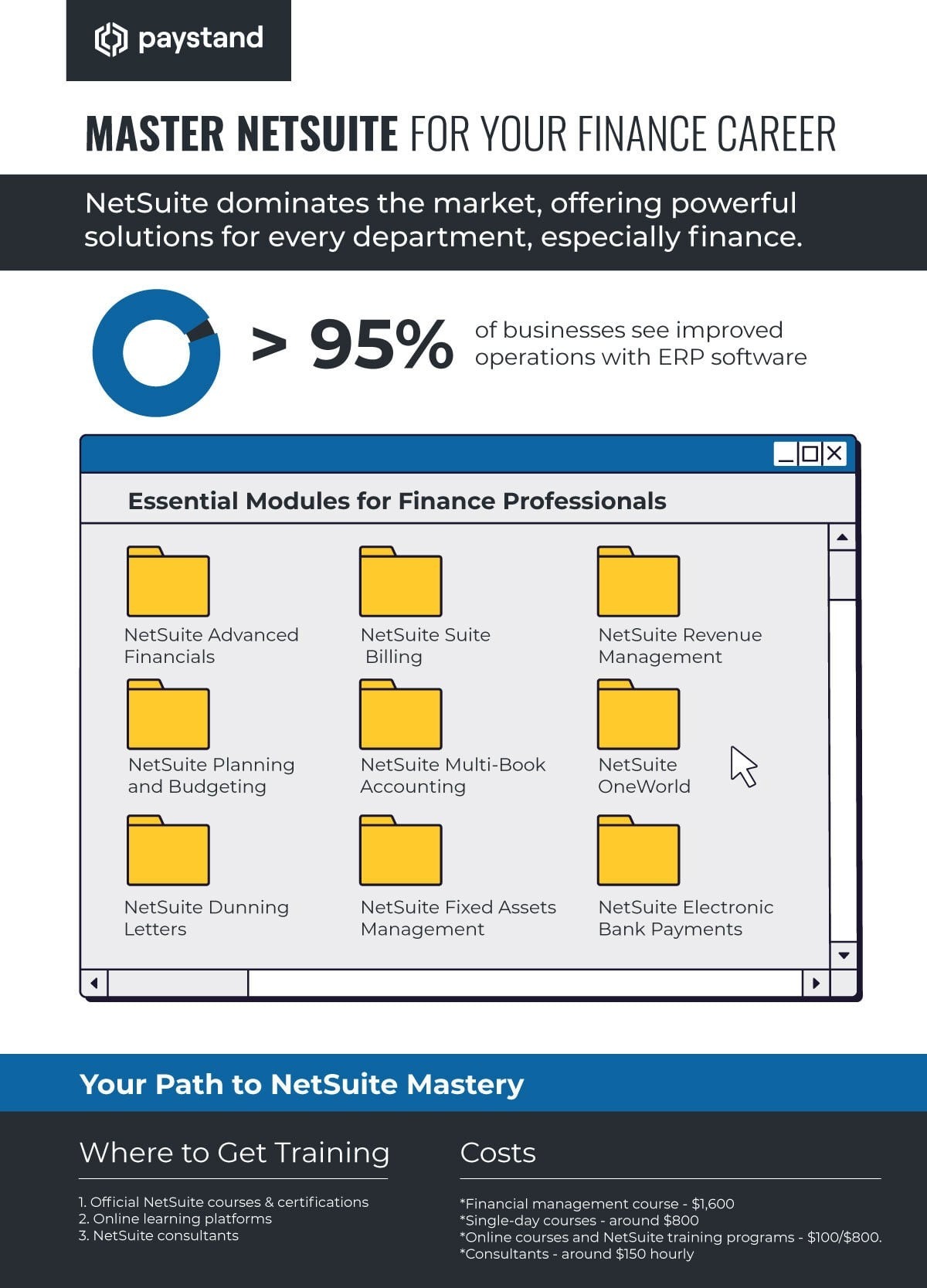
NetSuite training refers to structured education on Oracle NetSuite's cloud ERP platform, covering financial management, order management, inventory, CRM, and reporting capabilities. Training can range from basic navigation and transaction processing to advanced customization, saved search development, and SuiteScript programming.
The Core Components of Effective NetSuite Training
The basics of netsuite training should address three layers of competency. First, navigation and core transactions—how to create invoices, process payments, enter journal entries, and reconcile accounts. Second, reporting and analytics through saved searches, financial statements, and KPI dashboards. Third, business process optimization including approval workflows, automated notifications, and role-based permissions.
Organizations commonly make the mistake of treating NetSuite training as a one-time implementation event. The AP clerk receives eight hours of instruction during go-live, then struggles for months with tasks that weren't covered. The controller attends a vendor webinar but never practices building saved searches in a live environment. Training must be continuous, role-specific, and tied to measurable competency milestones.
Why Training Gaps Cost Organizations Real Money
Consider a mid-sized manufacturer processing 2,000 invoices monthly. If AR staff manually enters payment data instead of using NetSuite's electronic payment modules, each transaction consumes 5-7 additional minutes. That represents 167-233 wasted hours monthly, or roughly $4,000-6,000 in fully-loaded labor costs. The same organization may carry 15-20% excess inventory because purchasing managers don't understand NetSuite's demand planning tools, tying up $200,000-400,000 in working capital.
Training failures also create compliance and audit risks. Controllers who don't understand revenue recognition rules within NetSuite may configure the system incorrectly, leading to misstated financials. AP teams that bypass approval workflows create segregation of duties violations. These aren't abstract concerns—they represent real audit findings that damage credibility with boards, lenders, and acquirers.
Aligning Training Investment With Strategic Objectives
The most successful NetSuite training programs align curriculum with specific business outcomes. If your organization struggles with 65-day DSO, training should emphasize automated dunning workflows, payment portal configuration, and aging report analysis. If inventory turns lag industry benchmarks, focus on demand planning, reorder point optimization, and cycle counting processes.
This outcome-oriented approach transforms training from a cost center into a measurable investment. When the finance team can close books three days faster because they mastered period-end workflows, that time savings translates directly to reduced audit fees and faster financial decision-making. When AR managers build saved searches that identify high-risk accounts before they become write-offs, training ROI appears as reduced bad debt expense.

Where Can I Learn NetSuite for Free?
Free NetSuite training resources exist across multiple channels, though they require self-direction and time investment. Organizations should view free resources as supplemental learning rather than comprehensive training substitutes.
Official NetSuite Resources
SuiteAnswers serves as NetSuite's official knowledge base, containing thousands of articles, user guides, and troubleshooting documents. The Help Center within NetSuite provides context-sensitive guidance for specific tasks—clicking the help icon while creating a saved search surfaces relevant documentation. NetSuite also publishes release notes detailing new features and functionality updates twice annually.
The NetSuite User Community offers peer-to-peer learning through discussion forums where experienced administrators and developers answer technical questions. While response times vary and solution quality depends on community expertise, the forums provide valuable insights into common challenges and workarounds.
YouTube and Third-Party Educational Content
Independent consultants and NetSuite partners maintain YouTube channels with tutorial videos covering everything from basic navigation to advanced SuiteScript development. Channels like "SuiteTraining" and "NetSuite How-To" offer step-by-step walkthroughs for common tasks. Quality varies significantly—some videos feature outdated interfaces or incorrect procedures, requiring viewers to validate information against current documentation.
LinkedIn Learning and similar platforms occasionally offer netsuite courses, though these may require paid subscriptions. The advantage lies in structured curriculum and verified instructor credentials, unlike random YouTube content.
NetSuite User Group Meetings
NetSuite User Groups (NUGs) meet regularly in major cities and virtually, providing networking opportunities and educational sessions. These gatherings typically feature vendor presentations, customer case studies, and roundtable discussions on specific topics. While attendance is free, the real value comes from connecting with peers who have solved similar business challenges.
Hands-On Practice With Trial Environments
The most effective free learning combines documentation review with hands-on practice. NetSuite offers limited trial accounts for prospective customers, allowing users to explore core functionality. Current customers should request sandbox environments from their account teams—these non-production instances enable experimentation without risking live data.
Building proficiency with saved searches, for example, requires repetition. Read the documentation, watch a tutorial, then create 20-30 searches of increasing complexity in a sandbox environment. Test date filters, summary formulas, and custom columns. Make mistakes and troubleshoot errors. This iterative practice builds muscle memory that lecture-based training cannot replicate.
Can I Teach Myself NetSuite?
Self-directed NetSuite learning is viable for motivated individuals with strong technical aptitude and sufficient time allocation. Success depends on role requirements, learning style, and organizational tolerance for trial-and-error mistakes during the learning curve.
When Self-Teaching Works Best
Self-teaching succeeds most often for professionals with prior ERP experience who need to learn NetSuite-specific workflows rather than fundamental accounting concepts. The controller who mastered SAP understands general ledger structure, period close processes, and financial reporting—they need to learn where NetSuite stores those functions and how navigation differs from previous systems.
Single-module users also benefit from self-directed approaches. The AR specialist who only processes customer payments can focus narrowly on cash application, payment processing, and deposit reconciliation. The scope remains manageable, documentation is readily available, and mistakes have limited downstream impact.
The Hidden Costs of Pure Self-Teaching
Self-teaching carries opportunity costs that organizations frequently underestimate. The AP manager who spends 40 hours over three months figuring out approval workflows through trial and error could have learned the same material in 8 hours of structured training. That 32-hour differential represents $2,000-2,500 in wasted labor at typical finance salary levels.
Self-taught users also develop inefficient workarounds when they cannot solve problems properly. The accountant who manually exports data to Excel for pivot table analysis because they never learned to build saved searches. The billing clerk who creates invoices one at a time instead of using bulk processing. These workarounds persist for years, multiplying inefficiency across thousands of transactions.
Hybrid Approaches Maximize ROI
The most cost-effective strategy combines self-directed learning with targeted expert instruction. Use free resources to master basic navigation and simple transactions. Invest in formal training or consulting for complex processes like revenue recognition, multi-subsidiary consolidation, or custom SuiteScript development.
Many organizations adopt a "train the trainer" model where one power user receives comprehensive education, then conducts internal sessions for colleagues. This approach works well for standardized business processes but may fall short for advanced technical topics where the internal trainer lacks sufficient expertise.

How Long Does It Take to Learn NetSuite?
NetSuite proficiency timelines vary dramatically based on role, prior ERP experience, and depth of required knowledge. Basic competency for routine transactions typically requires 3-6 months of regular use, while advanced mastery can take 12-18 months or longer.
Timeline for Basic User Competency
An AR clerk processing cash applications and generating standard reports should reach functional competency within 6-8 weeks, assuming consistent daily use and access to documentation. This timeframe allows for initial training, supervised practice, independent execution with occasional support, and eventual autonomous operation.
Controllers and accounting managers face longer learning curves because they must understand the broader financial architecture—chart of accounts configuration, period close workflows, consolidation processes, and financial reporting. Reaching solid working proficiency typically requires 3-4 months, with continued learning over the first year as they encounter edge cases and month-end variations.
Advanced Functionality Requires Sustained Investment
Building complex saved searches—multi-table joins, custom formulas, conditional formatting—demands deeper technical understanding. Expect 6-12 months of regular practice before users can independently create sophisticated searches without extensive trial and error. SuiteScript development for custom business logic requires even longer, often 12-18 months to reach genuine proficiency.
The learning curve isn't linear. Users plateau at intermediate competency where they can handle 80% of routine tasks but struggle with exceptions and advanced scenarios. Breaking through these plateaus requires deliberate practice on challenging problems, not just repetition of familiar tasks.
Accelerating Proficiency Through Structured Programs
Formal netsuite courses compress learning timelines by eliminating dead ends and teaching best practices from experienced instructors. A comprehensive five-day boot camp might cover material that would take 3-4 months to learn independently. The upfront cost is higher, but the time savings and reduced errors justify investment for most organizations.
Certification programs provide structured learning paths with measurable milestones. NetSuite offers certifications for SuiteFoundation (basic concepts), Administrator, SuiteAnalytics, and ERP Consultant roles. While not mandatory, certification preparation forces systematic coverage of platform capabilities and validates competency to employers and clients.
How Difficult Is NetSuite to Master?
NetSuite's difficulty level varies by user role and required functionality depth. The platform is less technically demanding than enterprise ERPs like SAP or Oracle E-Business Suite, but more complex than entry-level accounting software like QuickBooks or Xero.
Navigation and Interface Challenges
NetSuite's web-based interface uses a dashboard-and-portlet model that feels intuitive once learned but initially confuses users accustomed to desktop applications. Finding specific features requires understanding how NetSuite organizes functionality—transactions live under different menus than reports, and customization options hide in setup pages that aren't immediately obvious.
The platform's flexibility creates its own complexity. Organizations can customize virtually every aspect—custom fields, forms, workflows, roles, and permissions. This power enables perfect alignment with unique business processes, but also means that every NetSuite instance looks different. Training materials must balance generic platform knowledge with organization-specific configuration.
Saved Search Complexity Intimidates New Users
Saved searches represent one of NetSuite's most powerful features and one of its steepest learning curves. Basic searches—customer lists with filters for open balance—are straightforward. Advanced searches combining multiple record types, using case statements, and calculating rolling averages challenge even experienced users.
The saved search interface itself confuses newcomers. Criteria tabs, Results tabs, Available Filters, and Summary Types aren't self-explanatory. Users must understand relational database concepts—how invoices link to customers, transactions link to items, and subsidiary structures roll up—to build effective multi-table searches.
Role-Based Difficulty Assessment
For AR/AP clerks processing routine transactions, NetSuite sits at moderate difficulty. Expect a learning curve comparable to learning any new business system, but nothing requiring advanced technical skills. For controllers implementing complex revenue recognition rules or multi-currency consolidations, difficulty increases substantially. For developers writing SuiteScript extensions, NetSuite demands JavaScript proficiency and API knowledge on par with custom application development.
Common Stumbling Blocks and How to Overcome Them
Organizations repeatedly struggle with permission and role configuration. Users cannot access expected functionality because role settings restrict visibility or editing rights. This creates frustration and support tickets that administrators must troubleshoot. Investing time upfront to properly structure roles and permissions prevents countless downstream problems.
Integration complexity also trips up finance teams. NetSuite needs to exchange data with payment processors, banks, CRM systems, and legacy applications. Poor integration design creates data inconsistencies, duplicate entry, and reconciliation nightmares. Organizations should engage integration specialists early rather than attempting complex projects with insufficient technical expertise.
Optimize Your NetSuite Investment With Paystand's Autonomous AR
NetSuite training helps finance teams understand how invoices, payments, customer records, and reports move through the ERP. But training alone doesn't eliminate the manual work that happens after every payment comes in. Your team can know exactly how NetSuite works and still spend hours matching remittance details, updating invoice statuses, reconciling deposits, and chasing payment information across disconnected systems.
Paystand brings agentic AI directly into your NetSuite AR workflows — automating the work that still lands on your team even after they know the system. Invoice data flows from NetSuite into Paystand's payment portal, where customers see open balances and pay without fees. Payment confirmations and remittance details land back in NetSuite instantly, applied to the right invoices and customer accounts — with AI handling the matching, routing, and reconciliation in real time, no manual hand-holding required.
The results compound as volume grows. Organizations on Paystand see 50–60% reductions in AR processing time and a 40% compression in DSO — on top of eliminating the 2–3% credit card fees draining every transaction. For teams already investing in NetSuite training, Paystand makes that expertise go further. Your people learn the ERP once; Paystand keeps the repetitive AR work from landing back on their desks every day.