












paystand symbol white logoAR + PAYMENTS
|
AP + EXPENSE
|
LATAM AR + AP
|
FX + PAYOUTS
|
.org
  • Receivables

    ACCOUNTS RECEIVABLES

    • Automatic Reconciliation
    • Collections Automation
    • Payment Portal
    • Convenience Fees & Incentives
    • Billing & Receivables Automation
    • Dashboard & Reporting
    • NetSuite NetSuite
    • Sage Intacct Sage Intacct
    • Dynamics 365 Dynamics 365
    • Acumatica Acumatica
    • Adobe Commerce Adobe Commerce
    • BigCommerce BigCommerce
    • Woo Commerce Woo Commerce
    • Xero Xero
    • All Integrations All Integrations
  • Payables

    ACCOUNTS payables

    • AP Automation
    • Accounting Automation
    • International Payments
    • Purchase Order Approvals & Spend Approvals
    • Customer Portal

    WHY NOW

    Our push into Accounts Payables comes with our mission of becoming the one stop shop for the CFO.

    By integrating AP, our financial suite becomes even more powerful as we aim to automate everything money.

  • Payments

    OUR NETWORK

    Discover how we enable your business to receive fee-less payments at a faster speed than your current solution.

    We transition your costliest payers into cost-effective payment rails to return the most positive of ROIs.

    OVERVIEW

    • B2B Payments
    • Paystand Bank Network
    • Check Scan
    • eCheck and ACH
    • Smart Lockbox
    • Canadian EFT
    • Push Payments (AI Match)
  • Expense

    EXPENSE

    • Spend Management
    • Corporate Cards
    • Procurement
    • Spend Analytics
    • Slack Slack
    • Microsoft Teams Microsoft Teams
    • Quickbooks Online Quickbooks Online
    • NetSuite NetSuite
    • Sage Intacct Sage Intacct
    • Microsoft Dynamics 365 Microsoft Dynamics 365
    • All Integrations All Integrations
  • Resources
    • Blog
    • Case Studies
    • Glossary
    • Podcast
    • Events
    • Webinars
    • Datasheets
    • eGuides

    INDUSTRIES

    • Healthcare
    • Manufacturing
    • Construction
    • Supply Chain
    • Solar Energies
    • Retail
    • Wholesale

    DATA & INFRASTRUCTURE

    • Enterprise Blockchain
    • APIs

    LEARNING RESOURCES

    • Improving Cash Flow
    • Optimizing AR
    • Reducing Costs
    • Bitcoin at Paystand
  • Company

    Company

    Paystand is revolutionizing B2B payments with a modern infrastructure built as a SaaS on the blockchain, enabling faster, cheaper, and more secure business transactions.

    Our mission is to reboot commercial finance by creating an open financial system.

    Payments as a Service

    PARTNERS

    Join Paystand's partnership program today.

    Become a Partner

    PRESS

    Read about Paystand business updates and technology announcements.

    Read About Paystand

    CAREERS

    Join our fast-growing team of disruptors and visionaries.

    Grow With Paystand

    ABOUT US

    See how we are rebooting commercial finance.

    Learn About Our Mission

    Where We Operate

    United states

    USAPaystand is headquartered in California and operates nationwide, serving businesses across all 50 states.


    canada

    CANADAWe support operations in Canada with localized payment capabilities, including CAD EFT and cross-border support.

Bitcoin
Get Started
  • Login
  • Receivables
    • Automatic Reconciliation
    • Collections Automation
    • Payment Portal
    • Convenience Fees and Incentives
    • Billing & Receivables Automation
    • Dashboard & Reporting
    • NetSuite
    • Sage Intacct
    • Dynamics 365
    • Acumatica
    • Adobe Commerce
    • BigCommerce
    • WooCommerce
    • Xero
    • All Integrations
  • Expenses
    • Spend Management
    • Corporate Cards
    • Procurement
    • Spend Analytics
    • Slack
    • Microsoft Teams
    • Quickbooks Online
    • NetSuite
    • Sage Intacct
    • Microsoft Dynamics 365
    • All Integrations
  • Payables
    • AP Automation
    • Accounting Automation
    • International Payments
    • Purchase Order Approvals & Spend Approvals
    • Customer Portal
  • Payments
    • B2B Payments
    • Paystand Bank Network
    • Check Scan
    • eCheck and ACH
    • Smart Lockbox
    • Canadian EFT
    • Push Payments: AI Match
  • Resources
    • Blog
    • Case Studies
    • Datasheets
    • eGuides
    • Events
    • Webinars
    • Glossary
    • Podcasts
    • Improving Cash Flow
    • Optimizing AR
    • Reducing Costs
    • Bitcoin at Paystand
    • The Future of Finance - Get Your Copy
    • Enterprise Blockchain
    • APIs
  • Industries
    • Healthcare
    • Manufacturing
    • Construction
    • Supply Chain
    • Retail
    • Solar
    • Wholesale
  • Company
    • Abous Us
    • Payments as a Service
    • Become a Partner
    • Press
    • Careers
  • Login
  • Get Started
Zazil Martinez 08/09/2024
4 Minutes

Zero-Touch Payments: Revolutionizing B2B Transactions

Zero-Touch Payments: Revolutionizing B2B Transactions

Table of Contents

  1. What is a Touch-Free Payment?
  2. What Does Zero-Touch Implementation Look Like?
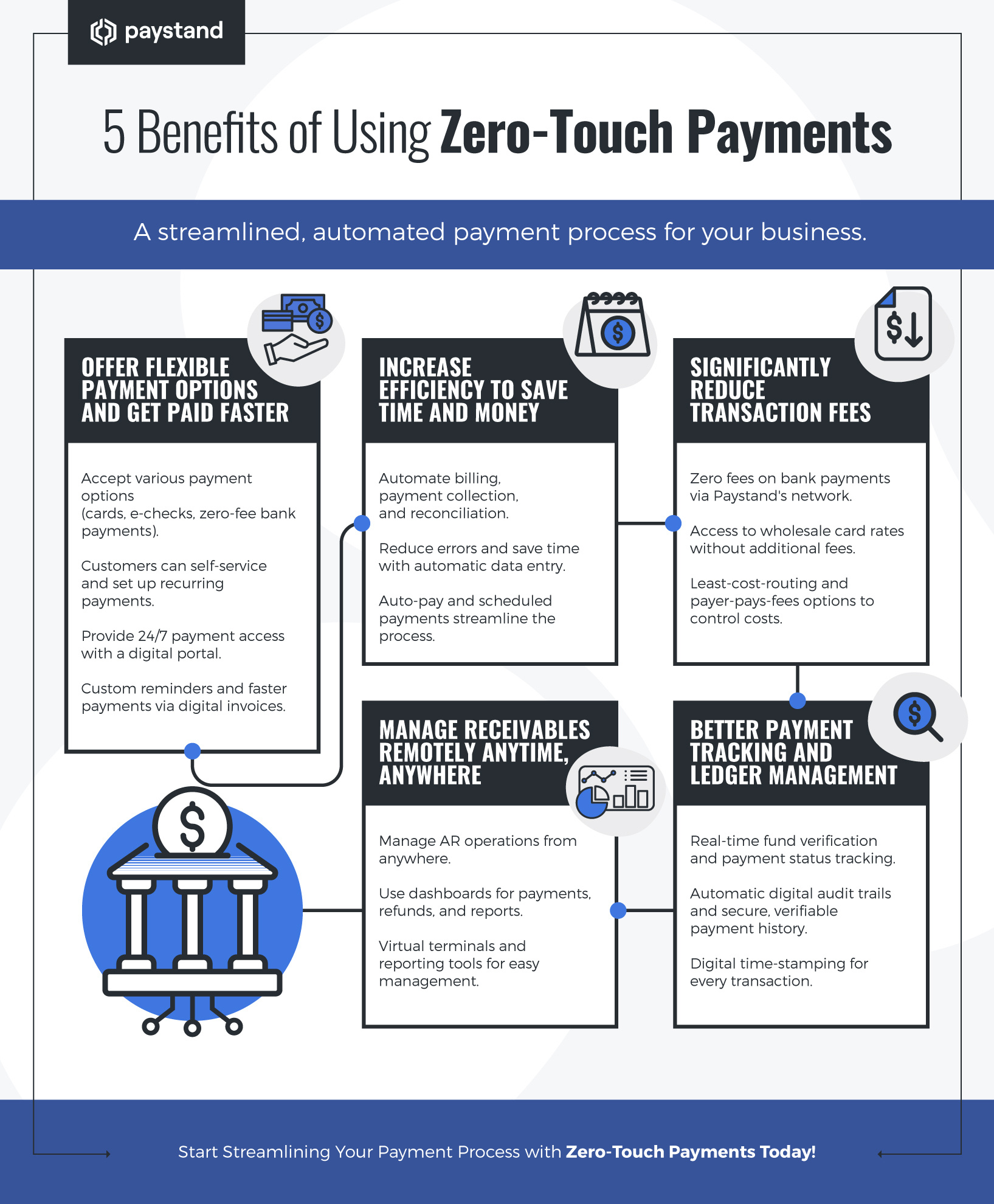
  3. 5 Benefits of Using Zero-Touch Payments


Key Takeaways

  • Zero-touch payment processing is a secure, automated method for collecting payments without cash or paper checks, offering increased speed and efficiency for businesses.
  • B2B zero-touch payment options include ACH, digital bank transfers, digital wallets, smart cards, and eChecks, each requiring a secure payment gateway for processing.
  • Implementing zero-touch payment processing involves digitizing and automating accounts receivable (AR) processes to enhance efficiency and security.
  • Key benefits of zero-touch payments include faster payment processing, increased efficiency, reduced transaction fees, remote receivables management, and improved payment tracking and ledger management.


Zero-touch payment processing, called contactless or touch-free payment, is a secure way to collect payments for goods and services virtually without using cash or paper checks. It's more popular than ever, but does it work?

89% of businesses that have shifted to automated, touchless AR processes say their processes are faster and more efficient. Other benefits include a streamlined customer service experience, cost savings, DSO improvement, and better collections.

Let's dig into how his payment option works, what digital payments are available, and the benefits of implementing Zero-Touch payment processing for B2B payments.

New call-to-action

What is a Touch-Free Payment?

Many associate touchless payments with tap-and-go credit cards, but other zero-touch alternatives don't carry transaction limits and hefty fees. Payment options include ACH, digital bank transfers, digital wallets, smart cards, and eChecks.

Generally, Zero-Touch payment methods for B2B companies can be classified into credit and bank payment systems. Both types require a secure payment gateway to accept and process payments.


Zero-Touch Credit Payments

  • Credit Card (Virtual Terminal): Virtual terminals let you securely charge credit cards remotely from a mobile device, computer, or tablet.
  • Smart card: A contactless credit card with a microprocessor that can be loaded with funds.
  • Virtual card: A digital form of card payment that allows you to create a unique 16-digit virtual card number that can be tied to a bank account.


Zero-Touch Bank Payments

  • Direct Bank Payments: A direct (or digital) bank payment moves money electronically from one bank to another.
  • eCheck: A digital version of a paper check that electronically transfers money from a bank account, typically a checking account.
  • Stored-value card: A card with pre-loaded funds that can be used to complete a transaction, such as a gift card or a charge card.
  • Electronic Funds Transfer: A bank transfer processed over a computer network among accounts at the same bank or separate institutions.
  • Automated Clearing House (Virtual Terminal): Virtual terminals also allow you to process ACH payments over a computer-based clearing house.


What Does Zero-Touch Implementation Look Like?

Zero-touch payment processing isn't only about collecting payments digitally; it's also about how you manage accounts receivable (AR) for your business. For an actual contactless payment experience, a company must set aside resources to digitize and automate its AR process to collect payments faster, safer, and more efficiently.

A digital transformation is necessary since a Zero-Touch payment strategy can include several different features and customizations, such as:

  1. Self-service payment options for customers
  2. Digitized documents, operations, and records
  3. Automated reconciliation, data entry, and other manual AR tasks
  4. Recurring billing options
  5. Saved fund-on-file for future payments

As a result, merchants will often need to invest in a payment gateway and integrate it with their chosen ERP.
Adobe commerce

5 Benefits of Using Zero-Touch Payments


1. Offer flexible payment options and get paid faster

You can accept multiple payment options remotely, including credit and debit cards, electronic checks/ACH, and zero-fee digital bank payments. Customers can self-service and set up recurring payments, allowing an automated approach to making payments:

  • Digital payment portal: When you set up a digital payment portal, there's no need for your team to be there to collect the payment manually. You can offer customers 24/7 access to make payments while reducing your overheads.
  • Custom reminders: It can help to send a friendly reminder when payment is due, but not all clients are the same. You can create custom plans for each client or category within the software.
  • Faster payment options: Paper checks may take weeks to arrive by mail, but electronic payment options allow your customers to use a 'Pay Now' from within the digital invoice. It's fast and easy, meaning you get paid much faster.


2. Increase efficiency to save time and money

Payment information goes directly into your accounting system, eliminating data entry and reducing opportunities for errors and misunderstandings.

  • Scheduled payments (recurring billing): Send out invoices and initiate payments automatically at specific dates and times.
  • Auto-pay: Get pre-authorization and securely vault customer payment information so you can authorize, charge, and collect payments automatically.
  • Automatic Reconciliation: Automatically reconcile payments to bank accounts and book payments to invoices and sales orders in your accounting software.


3. Significantly reduce transaction fees

  • No fees on bank payments: Paystand charges no fees on direct bank payments made via Paystand's bank-to-bank network (covers 98% of all commercial accounts and is used by over 350K businesses).
  • Wholesale card rates: Access our wholesale credit card processing rates with no additional fees or markups.
  • Least-cost-routing: Automatically steer customers to the payment rail, resulting in the lowest cost to the merchant.
  • Payer-Pays-Fees: Control whether you absorb the cost of fees, split them, or pass them on to your customer. You can even set a threshold that decides for you based on the invoice amount, customer location, or customer type.


4. Manage receivables remotely anytime, anywhere

You don't have to be in the office to run your AR operations smoothly. Zero-Touch allows you to send invoices, collect payments, store payment information, and remotely manage your payment process. That means you can get paid whether working from home, visiting clients, or out on the road.

  • Dashboard: This is where you can manage payments and refunds, run reports, monitor your integration, and more. It also includes useful analytics and charts that provide insight into your business's performance.
  • Virtual terminals: When authorized, you can take payments on behalf of customers from your dashboard. You can also enter information from previous payments, filled-in forms, or existing contracts.
  • Reporting: Run reports on your payments and accounts receivable to see which clients pay on time and which are frequently late. You could then adjust your payment terms to suit each client.


5. Better payment tracking and ledger management

Once a payment is initiated, what happens next? Traditionally, you would wait until the due date and keep running reports to see if you've been paid. And then start chasing if the money hasn't arrived. But with Zero-Touch payments comes automatic tracking:

  • Fund verification: Authenticate identity, verify good funds, and track payment settlement. Our real-time fund verification can determine if an account has sufficient funds to pay. This eliminates chargebacks, processing fees, and costly, time-intensive follow-ups.
  • View payment status: Quickly see your collected and pending receivables using standard or custom periods. Group your receivables into categories based on status and type. Receive updates the moment payment has been deposited in your account.
  • Digital audit trail: Paystand automatically creates digital records of every transaction. It also electronically certifies payments (from invoice request to paid receipt) to ensure your payment history is secure, electronically auditable, independently verifiable, and free of tampering.
  • Digital time-stamping: Paystand imprints an instant digital time-stamp (cryptographic hash) on the blockchain for each transaction made over its network to confirm a payment occurred.
Zero-Touch Payments: Revolutionizing B2B Transactions


Discover how Paystand can help businesses streamline their financial operations through B2B payment automation. Automate your AR process today, and join us on our journey to zero!


Written by Zazil Martinez

10 years of content creation for digital platforms, as well as a creative lead for advertising, marketing campaigns, and copywriting

Share:

  • Follow us on Facebook
  • Follow us on Twitter
  • Follow us on Linkedin
  • Follow us on Pinterest

Payment Verification: Secure Your Transactions and Prevent Fraud

Previous Post

Master Acumatica Certification: Your Path to ERP Success

Next Post
  • There are no suggestions because the search field is empty.

Subscribe Here!

Category

  • B2B Payments (112)
  • AR Optimization (96)
  • AR Automation (93)
  • Payment Processing (72)
  • Billing & Invoicing (71)

Popular Posts

Zazil Martinez 08/22/2024
What Is a TID Number? The Key to Secure Transactions
Analisa Flores 03/12/2025 Smart Lockbox
What is a Bank Lockbox Service and How is it Used for Payments?
Zazil Martinez 02/27/2025 B2B Payments, Billing & Invoicing, AR Optimization, AR Health
How to Improve Your Financial Decision Making?
Zazil Martinez 07/15/2024 Credit Cards
What is a Credit Card Hold? A Closer Look

Related Posts

Payment Processing
Analisa Flores 12 November, 2025

Payment Processing: The Foundation of Digital Trust & Business Growth

Table of Contents

Read This Article
Payment Processing
Analisa Flores 29 September, 2025

Short Payments: How to Handle, Prevent, and Resolve Them

Table of Contents What Are Short Payments? Why Do Short Payments Occur? How Short Payments Affect…

Read This Article
AR Automation, Payment Processing, AR Optimization, Collections
Vivek Shankar 09 September, 2025

How Accounts Receivable Management Transforms Your Cash Flow from Reactive to Predictive

Table of Contents

Read This Article

Paystand is on a mission to create a more open financial system, starting with B2B payments. Using blockchain and cloud technology, we pioneered Payments-as-a-Service to digitize and automate your entire cash lifecycle. Our software makes it possible to digitize receivables, automate processing, reduce time-to-cash, eliminate transaction fees, and enable new revenue.

  • Receivables
    • Automatic Reconciliation
    • Collections Automation
    • Payment Portal
    • Convenience Fees and Incentives
    • Billing & Receivables Automation
    • Dashboard & Reporting
    • NetSuite
    • Sage Intacct
    • Dynamics 365
    • Acumatica
    • Adobe Commerce
    • BigCommerce
    • Woo Commerce
    • Xero
    • All Integrations
  • Payables
    • AP Automation
    • Accounting Automation
    • International Payments
    • Purchase Order Approvals & Spend Approvals
    • Customer Portal
  • Legal
    • Privacy Policy
    • Terms of Service
  • Support
    • Knowledge Base
    • Developer Hub
  • Payments
    • B2B Payments
    • Paystand Bank Network
    • Check Scan
    • eCheck and ACH
    • Smart Lockbox
    • Canadian EFT
    • Push Payments: AI Match
  • Expense
    • Spend Management
    • Corporate Cards
    • Procurement
    • Spend Analytics
    • Slack
    • Microsoft Teams
    • Quickbooks Online
    • NetSuite
    • Sage Intacct
    • Microsoft Dynamics 365
    • All Integrations
  • Company
    • About Us
    • Payments as a Service
    • Become a Partner
    • Careers
    • Press
    • Sitemap
  • Resources
    • Blog
    • Case Studies
    • Datasheets
    • eGuides
    • Events
    • Podcast
    • Webinars
    • Glossary
  • INDUSTRIES
    • Healthcare
    • Manufacturing
    • Construction
    • Supply Chain
    • Solar Energies
    • Retail
    • Wholesale
  • DATA & INFRASTRUCTURE
    • Enterprise Blockchain
    • APIs
  • LEARNING RESOURCES
    • Improving Cash Flow
    • Optimizing Accounts Receivable
    • Reducing Costs

© Paystand, Inc. 2025. All Rights Reserved.